For hotels and resorts: bookings on WhatsApp, Instagram and Messenger, with 0% commission See how

English বাংলা
Products / Omnichannel inbox

One inbox for every customer conversation

No more WhatsApp on one phone and Instagram on another. Website chat, WhatsApp, Instagram and Messenger arrive in one list, the AI answers first, and a person can step into any conversation at any moment.

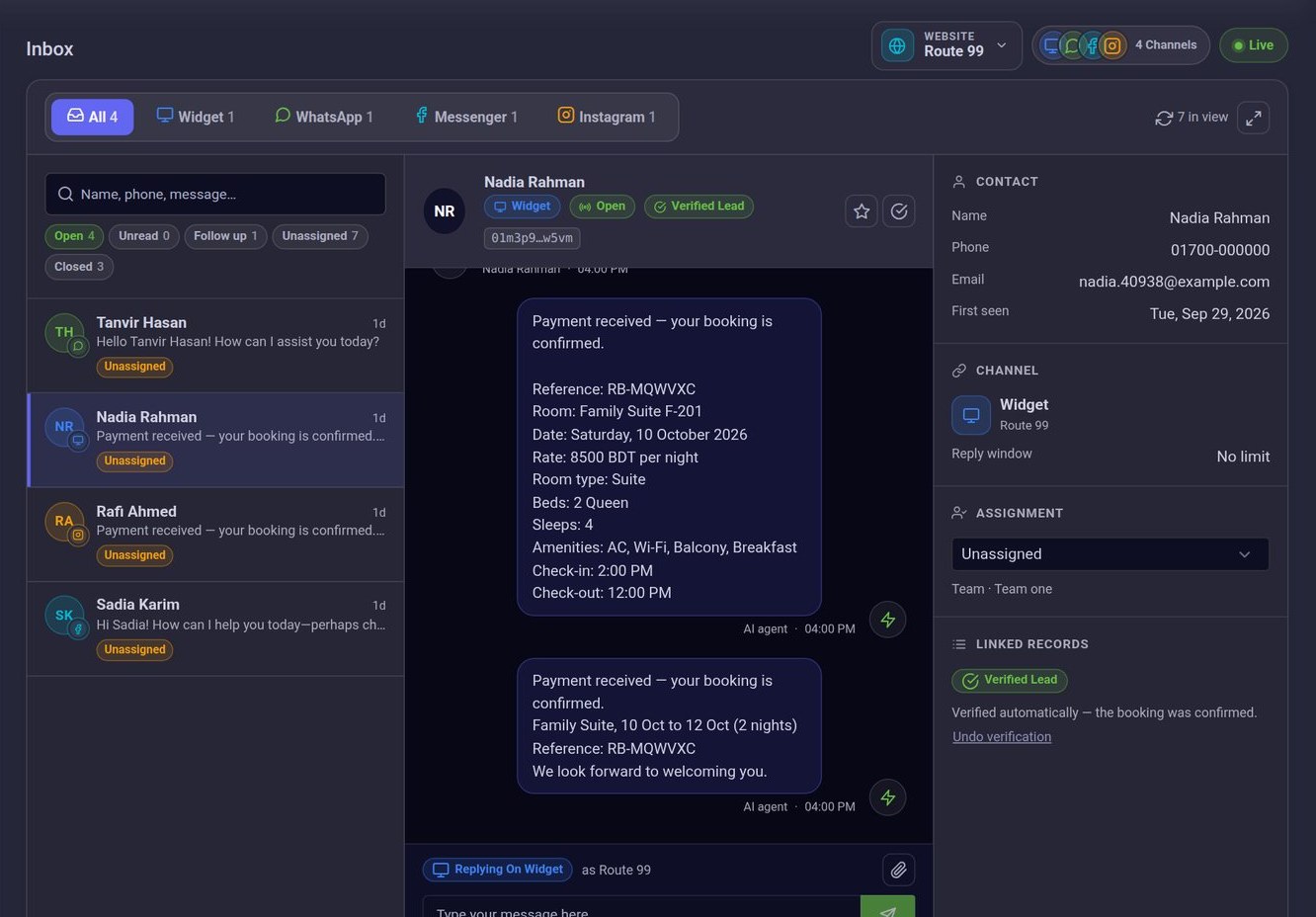
The inbox itself. This one belongs to a hotel; yours shows your own customers.
The ConversaAI inbox: channel tabs, the list of conversations, an open thread and the customer’s details

What goes wrong without one inbox

None of it is anyone’s fault. It is what happens when every channel lives somewhere different.

  • Each channel lives on a different phone or app.Whoever holds the phone holds the customer. Everyone else is blind.

    With ConversaAI: Website chat, WhatsApp, Instagram and Messenger arrive in one list, live, each marked with its channel.

  • Two people answer the same customer, or nobody does.Each assumed the other had replied.

    With ConversaAI: Every conversation shows who has it, and the ones nobody has taken have a filter of their own.

  • “I will get back to you” is forgotten by evening.The customer waits, then buys elsewhere.

    With ConversaAI: Flag a conversation for follow-up. It stays in the follow-up list until you clear it.

  • Nobody knows what the customer was already told.So they are asked the same thing twice, or told two different things.

    With ConversaAI: The whole history is in one thread, each message marked as the customer’s, the AI agent’s or a named teammate’s.

  • A WhatsApp reply is sent, and never arrives.WhatsApp delivers a reply only within 24 hours of the customer’s last message.

    With ConversaAI: The inbox shows how long that window stays open, and tells you before you send when a reply can no longer be delivered.

What happens to a message

  1. A customer writes

    On your website, WhatsApp, Instagram or Messenger. They install nothing and never change app.

  2. The AI agent answers

    In seconds, from your own information.

  3. It appears in your inbox

    Live, without refreshing, marked with its channel and website. A customer who leaves a phone number or email is saved as a lead.

  4. Your team takes it from there

    Reply in the thread, give it to a teammate, flag it for follow-up, and close it when it is done.

What your team works with

  • One list, a tab for each channel

    See every conversation together, or one channel at a time. The count on each tab shows where customers are writing today.

  • Find any conversation

    Search by name, phone number or a word from a message. Filter by open, unread, follow-up, unassigned or closed.

  • Reply on the customer’s channel

    Type in the thread and the reply leaves on WhatsApp, Instagram, Messenger or the website chat, with a photo or a file when you need one. The customer never has to move.

  • Assign, flag, close

    Give a conversation to a teammate or put it back in the queue, flag it for follow-up, and close it when it is done. It reopens by itself when the customer writes again.

  • The customer beside the conversation

    Name, phone, email and the date they first wrote sit next to the thread, with the lead that was saved for them.

  • Each person sees what they should

    You and your managers see every conversation; an agent sees the ones assigned to them. Each channel is a separate permission, and each website or branch has its own inbox.

See your own customers’ questions land in itIn a demo you ask what your customers ask, watch the AI answer, and see the conversation arrive in the inbox.

Book a demo

What is included

  • Website chat, WhatsApp, Instagram and Messenger in one list
  • New messages appear live
  • Search by name, phone or message
  • Filters: open, unread, follow-up, unassigned, closed
  • Assign to a teammate
  • Follow-up flag
  • Photos and files, sent and received in the thread
  • A clear notice when a reply was not delivered
  • The 24-hour reply window, shown
  • A separate permission for each channel, per person

Questions

Yes, in any conversation, at any time. Your reply appears in the same thread and leaves on the channel the customer used. Once a person has replied, the AI steps back: on the website chat for the rest of that conversation, and on WhatsApp, Instagram and Messenger for the next few hours.

No. They keep writing where they started, and every reply reaches them there.

No. New conversations and replies appear in the list as they arrive.

No. You and your managers do. An agent sees the conversations assigned to them, on the channels they have permission for.

Each one shows the teammate it is assigned to. Unassigned conversations have their own filter, and a conversation can be given to a teammate or put back in the queue.

WhatsApp, like Instagram and Messenger, delivers a normal reply only within 24 hours of the customer’s last message. The inbox shows how long is left, and once the window has closed it says so before you send, instead of letting a reply disappear. It opens again as soon as the customer writes.

No. Each website has its own channels and its own inbox. You choose one, or look at all of them together.

No. Start with the chat on your website and add WhatsApp, Instagram or Messenger when you are ready. Which channels are included depends on your plan.

It leaves the open list and keeps its full history. If the customer writes again, it reopens by itself.

Put every customer conversation in one place

Book a demo and see the inbox with the questions your own customers ask.